Outbox
The Outbox page is a repository of all reports that are generated as part of the reconciliation and settlement processes. It includes file upload error reports and all reports that are generated across all processes.
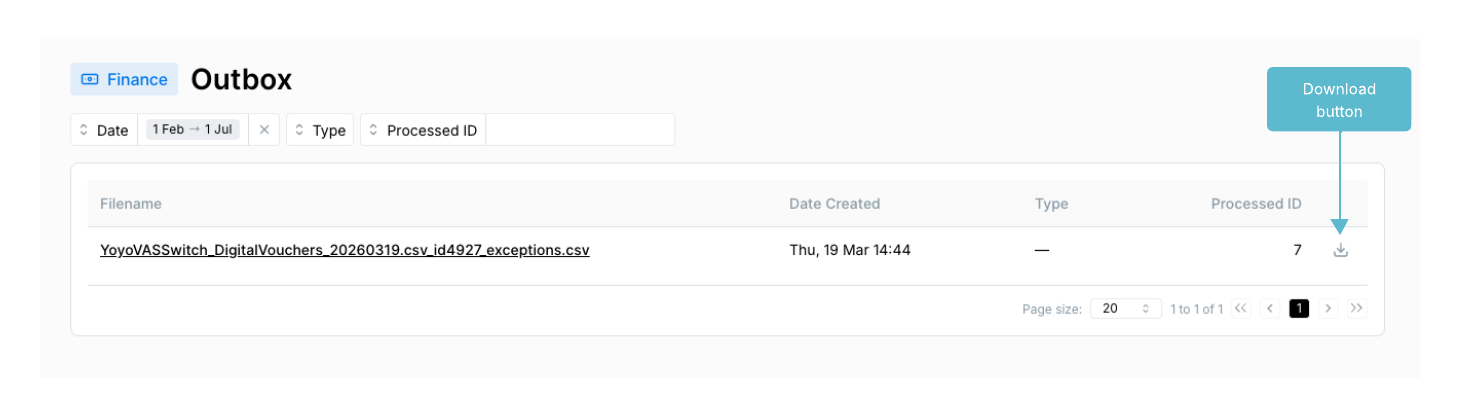
The Processes page has an Outbox tab at the top of the page (next to the Approvals tab), which contains reports generated for a service on a per-process basis. The Outbox on the left-hand side menu is a global outbox that contains all reports generated from all processes.
Electrum finance reports
Reports generated by Electrum Finance are defined during the configuration of a process and can be customised to suit specific business needs. Once configured, reports are generated automatically by Electrum Finance without operator intervention.
This configuration includes:
- The types of reports to be generated.
- The granularity of information included in report.
- Format and style elements of the report output.
- Email addresses for the generated report to be sent to from the server.
- Times and frequency of running reports.
Exceptions reports
An exceptions report provides information about exception records that were encountered during a file upload.
For each exception record that is, each record that failed to be loaded into Electrum Finance, the exceptions report includes the following information:
- Line number of the record in the file that was uploaded.
- Line record in the file that was uploaded.
- Reason for the exception (e.g., incorrect formatting).
Settlement reports
These are customised to meet the needs of each customer, including file format and branding for PDF files.
Downloading reports
To download a report
- In the Outbox page, identify the report to download.
- Click the Download button.
- In the window that opens, select a location for the downloaded file to be saved and click Save.