Alerts
For client integrations, Electrum creates and manages a number of configurable alerts that are broadly categorised under the following alert types:
Tech-Ops: alerts designed to inform the relevant stakeholders of potential service issues such as service provider outages or errors relating to timeouts or declined transactions. Common alert categories include:
- Service health alerts such as success rate alerts, failure rate alerts and timeout rate alerts.
- Traffic alerts to flag instances where transaction processing unexpectedly drops to zero.
- Other alerts including queue health, error rates, and others.
Fin-Ops: alerts that advise on whether there are missing reconciliation files that prevent reconciliation and settlement from being undertaken. Common alert categories include:
- Missing reconciliation files.
Infrastructure and Engineering: alerts that enable Electrum to analyse the system's internal operations. Common alert categories include:
- System resource utilisation.
- Application performance.
- System health.
- Dependency health.
As a client, you can view alerts across all your integrations via the Electrum Console Alerts page:
- Currently, Electrum can provide clients with visibility of Service Health Alerts and Traffic Alerts.
- In future, Electrum intends to expand visibility to other service-related alerts, Fin-Ops alerts and Infrastructure and Engineering alerts.
Alerts Management
The Alerts Management tab lists all alerts that have been set for a client across all their integrations through Electrum in a given development environment. Alerts are grouped by service.
The tab provides an overview of the following high-level parameters pertaining to each alert:
- Enabled - indicates whether an alert is currently in operation or not by defining it as Enabled or Disabled.
- Type - indicates which operational type the alert falls under. For example, Tech-Ops, Fin-Ops, Infrastructure or Engineering. (Note that only Tech-Ops alerts are available currently.)
- Category - indicates what final transaction outcome is being alerted on. For example: timeout, success, or failure.
- Status - indicates whether an alert is currently working as intended, or not. Alert status can be designated as Active, Inactive, or Unknown.
Click on any alert in the list to reveal a drop-down menu that shows the full breakdown of the alert information, including rule details and event details.
In the future, clients will be able to configure their own alerts, based on the set number of alert parameters defined below, via this tab.
Alerts Log
The Alerts Log tab gives a breakdown of all the alerts that have fired (i.e., triggered) within a specified time range.
This page gives a view of:
- Alerts that have triggered - the names of the alerts that have fired within the specified time range.
- Type - which operational type the alert falls under. For example, Tech-Ops, Fin-Ops, Infrastructure or Engineering. (Note that only Tech-Ops alerts are available currently.)
- Category - indicates what final transaction outcome is being alerted on. For example: timeout, success, or failure.
- Last triggered - the most recent instance of this alert firing.
- Time - the number of times the alert fired within the specified time range.
Where an alert has fired multiple times, navigate to that alert to view a drop-down menu listing the times that the alert fired within a specified time range.
Alerts can be filtered and searched for based on the following parameters:
- Time range
- Type
Structure of Alerts
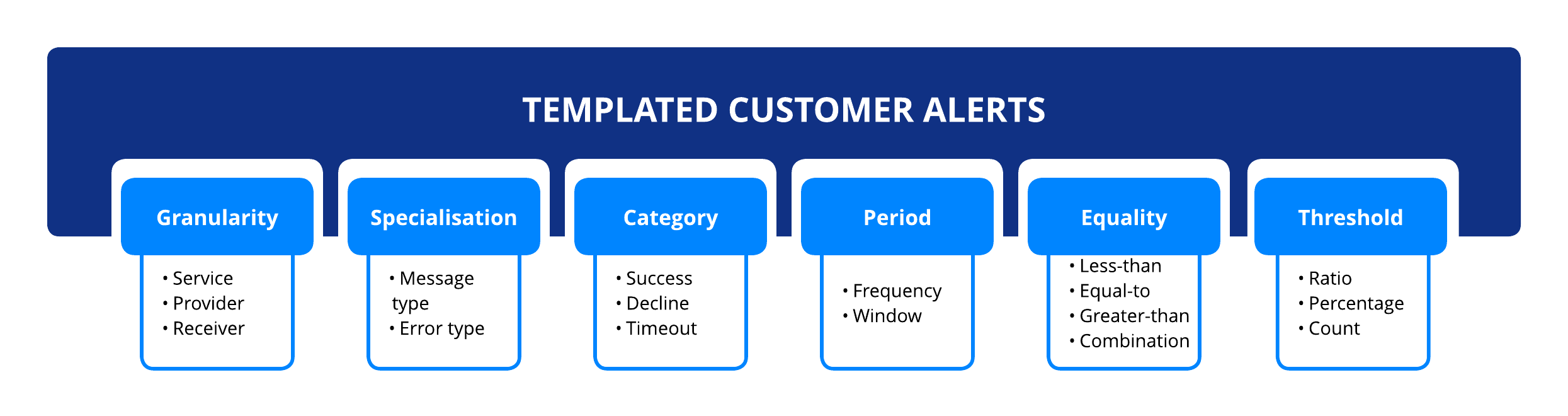
Alerts will be defined by a template structure of separate alerting parameters. These parameters are defined in (and in the future will be editable via) the Electrum Console front-end interface. The following parameters will define a full structured alert:
Granularity - the entity/integration level at which an alert is set. Specifically, alerts can be set according to:
- Service (e.g., Airtime, Lotto).
- Service provider (e.g., Blue Label Telecoms, Contour).
- Receiver (e.g., MTN, City of Cape Town municipality, Multichoice).
Message type (specialisation) - the particular API operation or API error type.
Transaction outcome type (category) - the outcome of a particular transaction to which the alert pertains.
- Success
- Decline / Failure
- Timeout
Threshold - the ratio, percentage, or flat count value at which an alert should fire.
Period - the length of time time over which data will be considered for a particular alert and the frequency with which the system should check that given time period to identify whether an alert should fire.
Equality - the mathematical definition paired with the threshold to define when an alert should fire. For example the equality and threshold can be combined to make an alert that fires when a threshold passes anything greater than 90%.