Airtime Catalogue Management
Overview
If you have implemented Electrum’s Airtime solution then you will have an airtime product list, or catalogue, containing details of all the products you offer to consumers. Over time the catalogue will change; for example, you may need to remove airtime products if the upstream service provider no longer offers that product, you may need to add new products, or make updates to existing ones.
Electrum has enhanced our cataloguing capabilities. You can now view, edit, manage, and review your airtime catalogue from the Electrum Console.
This document gives an overview of the new catalogue features that will help you manage your airtime catalogue. See the Airtime Catalogue User Guide for more detailed step-by-step instructions on how to use these features.
1. View and Edit Your Airtime Catalogue
The Airtime Catalogue page in the Electrum Console gives a view of your current airtime catalogue, including:
- The version that is currently active in a specific environment.
- Whether there is a draft version of the catalogue in progress.
- If there is not a draft currently in progress then you can start a new version by clicking on the Create New Draft option in the top right corner of the page.
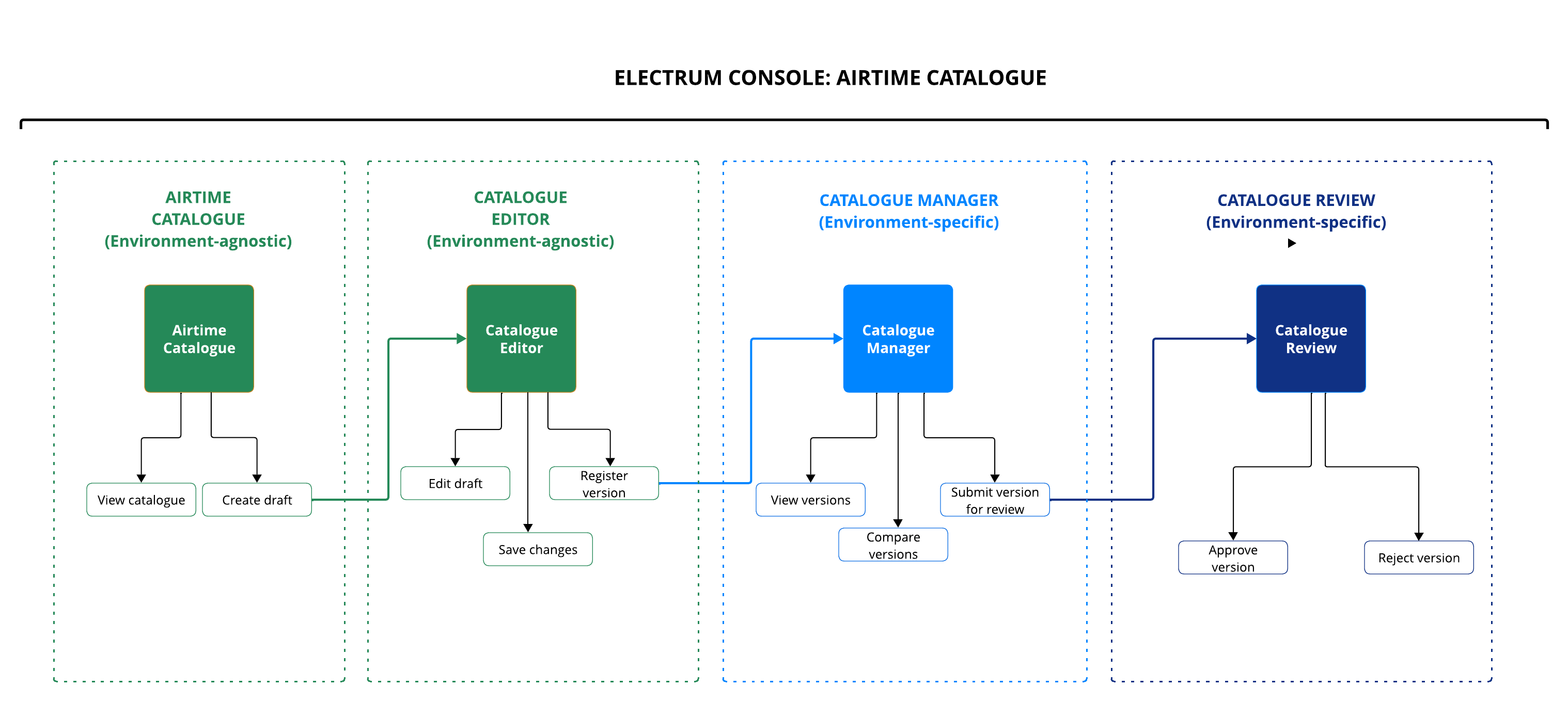
Catalogue editing is now done directly from the Electrum Console, where you can access the Catalogue Editor from the Airtime Catalogue screen. From here you can:
- Edit a draft catalogue.
- Save the changes.
- Register a draft catalogue as a new version.
- The registered catalogue then becomes visible in the Catalogue Manager page in the Electrum Console.
When you register a version in the Catalogue Editor it will become available in all your environments of the Electrum Console (int, pre-prod, prod). Note that the Dev environment is kept separate as this tends to be used by Electrum for testing.
You can then manage the catalogue within specific environments from the Airtime Catalogue Manager and Catalogue Review pages in the Electrum Console.
You must use the Catalogue Editor to edit your airtime catalogue. Do not use the Console Configure Mappings or Retool features to make changes to your catalogue.
Users can only access Catalogue Editor from the Airtime Catalogue page. This provides an extra layer of safety to prevent Console users from accidentally making edits to the catalogue.
2. Manage Your Airtime Catalogue
This Catalogue Manager page is environment specific. Any actions you perform here will apply only to that environment. It is therefore possible that, at any given time, each environment has a different live catalogue version.
Make sure that you are working in the correct environment in the Electrum Console.
The Catalogue Manager contains a list of all catalogue versions registered from Catalogue Editor.
Each version will have a specific status according to the table below.
| Catalogue Version Status | Description |
|---|---|
| REGISTERED | The version is available for use but is not active in a given environment. |
| ACTIVE | The version is active, or live, in that environment. (For example, in the Production environment this is the version that is currently being used during transaction processing.) |
| IN REVIEW | The version has been submitted for review and is awaiting approval (or rejection) by a reviewer. If a reviewer approves a catalogue version then it will become the active version in that environment. |
| DRAFT | The version that is still in draft form and that has not yet been registered. |
You can now perform the following functions from the Catalogue Manager page in the Electrum Console.
- Identify the active catalogue version in the environment.
- View any catalogue version.
- See the full list of entries for any registered catalogue, including new or previously registered versions.
- Create a new catalogue draft by making a copy of any catalogue version.
- You can then edit the draft from the Catalogue Editor.
- Compare catalogues.
- Compare any two registered catalogues.
- See a summary view of the differences between the two catalogues - the number of entries that have been added, deleted, or edited between the two versions.
- See a detailed view of the entries that have been added, deleted, or edited.
- Submit a catalogue version for review and approval.
- You do this when you want to replace an existing catalogue (that is active in the specific environment) with a different version. The version status will change from REGISTERED to IN REVIEW.
There can only be one catalogue version in the IN REVIEW state at a time. If you submit a second version for review while there is already one in review, then the first catalogue version will revert to a REGISTERED state.
See the user guide for step-by-step instructions on how to perform these functions.
3. Review Your Airtime Catalogue
This Catalogue Review page is environment specific. Any actions you perform here will apply only to that environment. Make sure that you are working in the correct environment in the Electrum Console.
A user with reviewer permissions can perform the following functions from the Catalogue Review page in the Electrum Console.
- Review a submitted catalogue.
- See a summary view of the changes between versions - the number of entries that have been added, deleted, or edited in the submitted catalogue compared to the one that is currently active in that environment.
- See a detailed view of the entries that have been added, deleted, or edited.
- Approve a submitted catalogue version.
- You will need to provide a comment and perform specific actions to activate the catalogue to that environment.
- These security measures prevent the reviewer from wrongly activating a version.
- The version status will change from IN REVIEW to ACTIVE.
- You must remember to check the Configure screen in the Console to ensure that the activated catalogue was loaded successfully.
- Reject a submitted catalogue version.
- If you do not wish to activate the submitted catalogue, you can reject it with a reason for the rejection.
- The catalogue will still be available for use in future but will not be activated in the environment. The status will revert from IN REVIEW to REGISTERED.
See the user guide for step-by-step instructions on how to perform these functions.
All steps require that authorised users input comments and/or confirm actions. This is both for audit purposes and to prevent catalogue versions from getting accidentally or erroneously activated in an environment. All audit information is visible to you.
The diagram below shows the interplay and workflow between the various Console Airtime Catalogue pages.