Product overview
Prepaid utilities (PPU) services allow consumers to purchase amenities such as electricity, gas, or water from service providers via retailers, banks, or other payment interfaces. The consumer tenders a chosen amount of money for a specified prepaid meter number and receives a token. The token is then used to top up the meter.
The Electrum Prepaid Utilities Service facilitates transaction switching between the originating system and multiple service providers.
High Level Architecture
The figure below depicts the high-level architecture of the Electrum Prepaid Utilities Service. The originating system – which could be a digital channel, or an in-store point of sale – communicates with the Electrum Prepaid Utilities Service Interface. The Electrum Switch in turn connects to multiple service providers. Electrum Finance supports transaction matching, reconciliation, and financial reporting, and the Electrum Console is the system's user interface which provides tools for transaction lookup, configuration, reporting, and back-office functions.
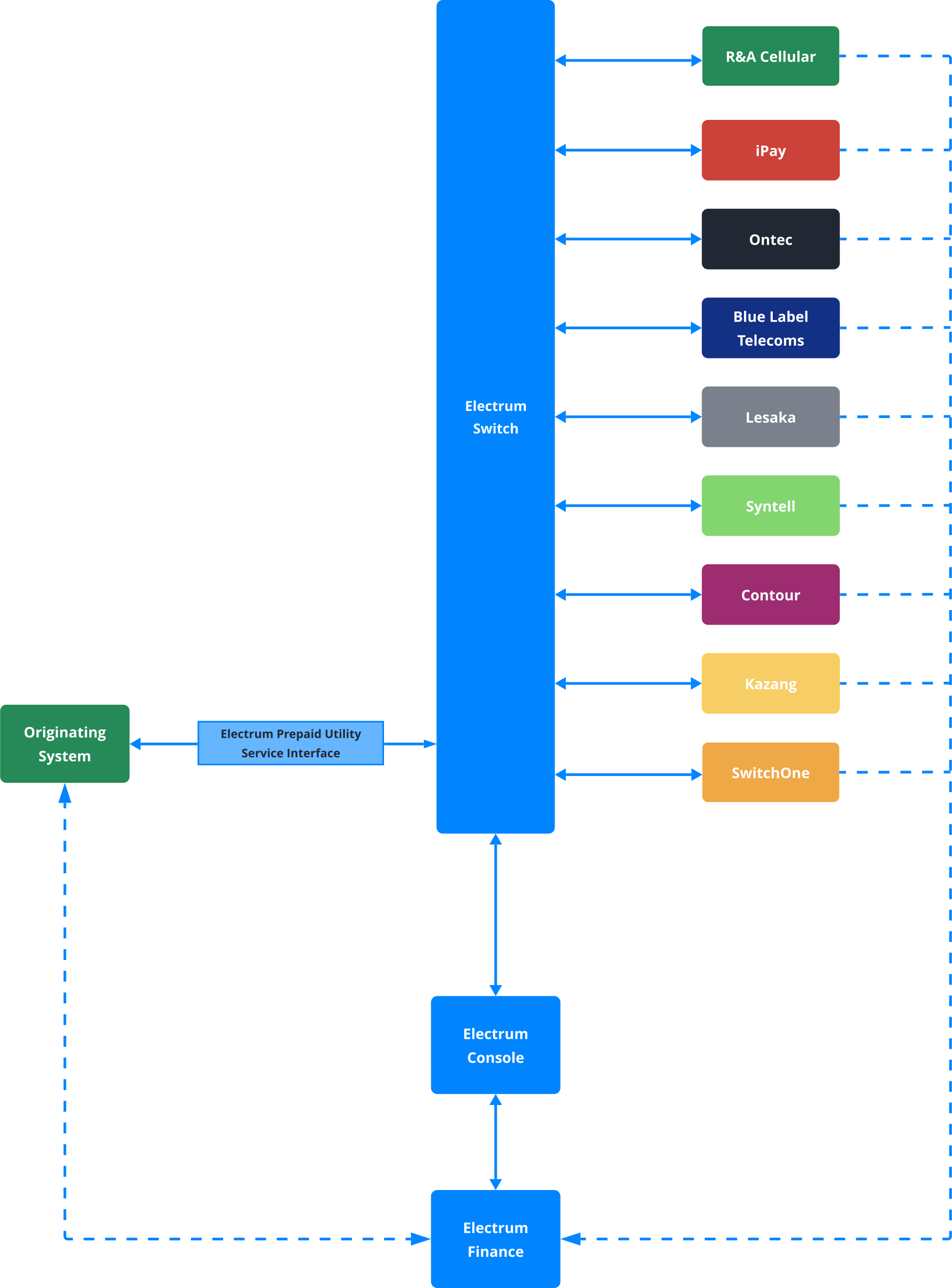
Service Providers
The service providers supported are listed below.
- iPay
- Ontec
- Blue Label Telecoms
- Lesaka
- Contour
- Syntell
- Kazang
- SwitchOne
- R&A Cellular
The service providers support the following prepaid utilities.
- Electricity
- Water
- Gas
We recommend that you contract with more than one service provider in order to cover a wider consumer base.
Electrum does not manage any commercial arrangements or contracting. These should be done directly with the service providers.
Transactions
The Electrum Prepaid Utilities Service supports the following mandatory transactions:
- Meter lookups – verification of a consumer's meter number
- Token purchases – issuing of a token against a specified meter number
- Retries – retrying of a previously submitted purchase request that did not receive a response
Provider Retries
The following providers support PPU retries and reprints:
- Lesaka
- Blue Label Telecoms
- SwitchOne
- Kazang
- Contour
- Syntell
- R&A Cellular
Any additional transaction types are optional and provide extra functionality. These are listed below.
Additional Transactions
Additional transactions are supported by certain providers as shown in the table below. More information about these transactions and what they entail can be found on the implementation pages.
| Service Provider | Additional Transactions |
|---|---|
| Ontec via iPay |
|
| Contour |
|
This service does not support refunds.
Routing
When a consumer requests to purchase a prepaid utility token, the originating system initiates the process by sending a meterLookup request to Electrum. The meter lookup phases confirm which municipality or utility supports the meter number and which service providers support the municipality or utility. A purchase request then follows, and this will be routed according to the details contained in the response to the meterLookup request.
Electrum consults the contract table - which contains the list of meter numbers, the municipalities to which they belong, and routing information - upon receiving a meter lookup request.
If the meter number is unknown to Electrum, then Electrum will implement broadcasting to determine which service providers can or cannot support that meter number.
If the meter number is a known one and exists in the contract table, then Electrum will determine, from the contract table, how to route the transaction.
Broadcasting
Broadcasting is a strategy that enables Electrum to determine which service providers are able to service a specific prepaid utility meter. The information that is obtained from broadcasting is stored in the contract table and used to route future transactions.
The procedure is as follows:
- If Electrum receives a meter lookup request and the meter number is not yet known and there is no match in the contract table, then Electrum broadcasts the meter number to all service providers.
- The various service providers respond that they do or do not support that meter number, and Electrum stores the details in the contract table.
- Now that the meter number has associated provider information stored in the table, transactions can be routed as follows for all subsequent PPU transactions under that meter number:
a. If a preference has been set for a certain provider to service a specific municipality, then transactions will be routed according to the preference (preferential routing). b. If no preference is set, or if the preferred service provider is not available, then Electrum will respond based on the Load Balancer weightings (e.g., 50% of purchase transactions to Provider A, 20% to Provider B, and so on.)
Electrum allows you to configure the overall timeout period for how long it waits for provider responses. You can set the timeout period according to your preferences.
If some service providers did not respond during the initial meter number broadcast, then Electrum will continue to broadcast the number for subsequent lookups, until all service providers have responded and all details can be captured in the contract table.
Preferential Routing
Preferential routing means that Electrum’s downstream partner has previously indicated a preference for a specific provider to provision a prepaid electricity token. This preference is usually based on the municipality to which the meter number belongs; i.e., certain service providers are preferred for certain municipalities.
To enable preferential routing, Electrum requires downstream partners to provide their routing preferences for each municipality. This information is uploaded to the Electrum database. Subsequent lookups for municipalities with defined preferred routes will be directed to the relevant service provider.
Partners must notify Electrum of any updates, whether due to a change in the network of municipalities that a specific service provider services or a change in the commercial agreement with a service provider.
If the preferred service provider is unavailable at the time, then Electrum will route to another service provider that support the transaction.
Till Slips
For integrations that require a physical till slip to be presented to the consumer who makes a Prepaid Utility purchase, Electrum offers two solutions for generating the printed token that will allow our client to redeem the consumer's purchase.
Electrum will use the data returned following a successful transaction to populate the slipData field in the PurchaseResponse message with relevant data and formatting instructions needed for a POS device to print the information as a till slip.
Alternatively, clients who wish to implement the data extraction and formatting themselves may choose to take data directly from the PurchaseResponse fields and print this with their own formatting.
Meter-Municipality Contract Table Management
Electrum stores information around which provider supports which meters, and which municipalities those meters are associated with, in a contract table. However, municipality ownership can change between providers, which means that the routing information contained in the contract table may fall out of date.
To mitigate this, Electrum regularly repeats the broadcasting procedure described in the section above, and updates the contract table to reflect the routing information based on the latest provider-municipality agreements. This procedure can be done monthly, or according to your preference.
Send a request to the Electrum support team in cases where a provider has notified you of a municipality change, and you would like to change the municipality preference in the Electrum contract table. Provider-municipality preference will be maintained where the relevant meter is still supported.
Electrum Finance
Electrum Finance is a collection of tools to facilitate the reconciliation of transaction records between multiple parties, calculation of principal settlement amounts and fees, and generation of reports required for finance processes.
For more details of the processes and available features, see our Electrum Finance pages as well as this section of the Electrum Console help guide.
Tools for Support and Monitoring
The Transactions screen of the Electrum Console provides a detailed view of each transaction processed by the Electrum Switch. Here you can perform the following to help troubleshoot potential issues:
- Filter transactions based on various parameters
- Search for a specific transaction by its unique reference
- View a summary of pertinent data for individual transactions
- View the full request and response message traces between the originating system and the Electrum Switch
- View the full request and response message traces between the Electrum Switch and the service provider
For more details on how to utilise these features, see the Transactions page of the Electrum Console help guide.
Kibana Dashboards
Electrum uses the Elasticsearch, Logstash, Kibana (ELK) stack for low-level application monitoring. To assist you with supporting your services, we provide you with access to preconfigured Kibana dashboards to visualise traffic being processed by the Electrum Switch. The following dashboards are available:
- Message overview
- Message cog detail
- Health check
- Store-and-forward (SAF) queue
- Alerts are also configured to send email notifications when the system health changes.
For more details on each dashboard type and its use, see the Monitoring and Alerts page.
Connectivity and Security
The standard connectivity and security between the originating system and the Electrum Switch is via HTTPS using basic authentication and server-side SSL. This requires that endpoints are allowlisted. The following additional security options are also available if required:
- HTTPS using basic authentication or OAuth2
- HTTPS using basic authentication or OAuth2 in conjunction with mTLS1.2+
- Connection via VPN
See here for more information about authentication options.
The requirements for connectivity and security must be discussed with Electrum prior to implementation.