Product overview
A PIN-based airtime purchase takes place when a customer buys a mobile airtime or data product via a digital channel, or at a retailer point of sale (POS). The product is delivered to the customer in the form of a code (or PIN), along with instructions on how to load the value onto a prepaid mobile account.
The Electrum PIN-based Airtime Service facilitates PIN-based purchases for bank and retailer channels by processing requests for airtime and data products between the originating system and one of multiple service providers.
High-Level Architecture
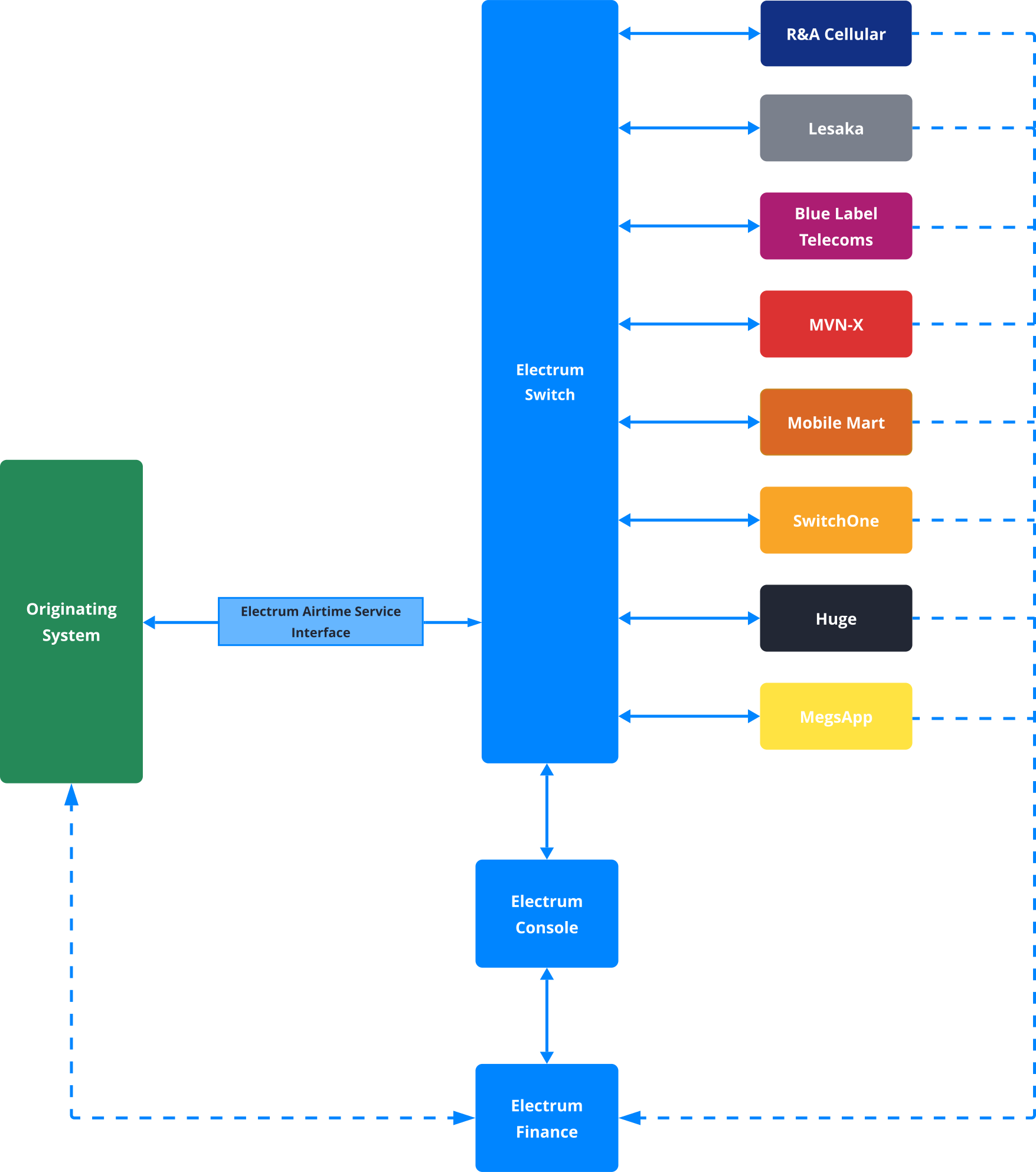
The figure below depicts the high-level architecture of the Electrum PIN-based Airtime Service. The originating system – which could be a digital channel, or an in-store point of sale – communicates with the Electrum Switch via the Electrum Airtime Service Interface. The Electrum Switch in turn connects to multiple service providers, and optionally one or more payment providers. Electrum Finance supports transaction matching, reconciliation, and financial reporting, and the Electrum Console is the system's user interface which provides tools for transaction lookup, configuration, reporting, and the aforementioned back-office functions.
Service Providers
The table below shows the service providers currently supported by the Electrum PIN-based Airtime Service, and the respective Mobile Network Operators (MNOs) for which products are supplied:
| Service Provider | Description | MNOs |
|---|---|---|
| Lesaka | Lesaka serves as an aggregator of PIN-based airtime and bundle transactions. |
|
| Mobile Mart | Mobile Mart serves as an aggregator of PIN-based airtime and bundle transactions. |
|
| Huge | Serves as an aggregator of PIN-based airtime and bundle transactions. |
|
| Blue Label Telecoms | Blue Label Telecoms serves as an aggregator of PIN-based airtime and bundle transactions. |
|
| SwitchOne | SwitchOne serves as an aggregator of PIN-based airtime and bundle transactions. SwitchOne also supports cross-border airtime sales in neighbouring countries, including Namibia, Botswana, and Zimbabwe. |
|
| MegsApp | Serves as an aggregator of PIN-based airtime and bundle transactions. |
|
| MVN-X | MVN-X serves as an aggregator of PIN-based airtime and bundle transactions. |
|
| R&A Cellular | R&A Cellular serves as an aggregator of PIN-based airtime and bundle transactions. |
|
Airtime Products
The following products are supported, as supplied by the various service providers:
- Fixed value airtime
- Variable airtime
- SMS bundles
- Fixed value data
- Fixed value social media products
- Fixed value voice bundles
Variable airtime allows the consumer to specify their own chosen value of airtime, if they choose not to select from the limited list of fixed value options supplied by the service provider. Certain minimum and maximum values may be imposed by the service provider.
Transaction Types
There are three separate legs that make up a PIN-based airtime. The corresponding transaction types are defined below.
| Transaction | Description |
|---|---|
| Purchase request | Requests that a new PIN be generated for the selected product and returned to the originating system. |
| Confirmation | Confirms that the tender has been completed for a prior purchase request, and the customer has been presented with the PIN. |
| Reversal | Informs that a prior purchase request has been cancelled and that the customer has not received a PIN. |
The following transaction types are not supported:
- Refunds
- Product list lookups
- Trial purchases
- Purchase status lookups
- MSISDN lookups
Confirmation Messaging
Confirmation messaging forms part of the standard PIN-based airtime purchase flow and it is required that originating systems implement this feature.
If a case arises where a service provider does not support confirmation messaging, the originating system can still invoke a confirmation call to the Electrum API. The confirmation message will simply be stored internally by the Electrum Switch and will not be forwarded to the service provider.
Routing
The Electrum PIN-based Airtime Service allows for the following types of routing to determine which service provider should process the transaction:
- Routing by product ID
- Routing by MNO
The choice of routing must be discussed with the Electrum team prior to implementation.
Routing by Product ID
This routing method requires a product catalogue, containing product IDs, which must be managed and maintained. This can be done in one of the following ways:
If more than one service provider is being used, then the originating system should use their own product IDs or barcodes, which are then mapped to the corresponding service provider IDs by the Electrum Switch. These mappings can be managed using the Electrum Console configuration functionality.
If only one service provider is being used, then the originating system can use the product IDs supplied by the service provider.
Routing by MNO
Routing by MNO requires that the originating system set the appropriate field in the request message to specify the MNO. If the originating system has integrations with multiple aggregators that supply products from the same MNO, then routing can happen in two ways:
The originator can allow routing to be determined based on aggregator weightings in Electrum's load balancer. The originator is able to configure aggregator weightings in the Electrum Console. (For more details about the load balancer and a step-by-step guide on how to use it, see the Load Balancer page of the Electrum Console help guide.)
The originator can choose to route to the MNO via a preferred aggregator exclusively. This may occur, for example, because of favourable commercial agreements between the originating system and a certain aggregator. Electrum will need to configure this type of routing inside the Electrum Switch
Electrum Finance
Electrum Finance is a collection of tools to facilitate the reconciliation of transaction records between multiple parties, calculation of principal settlement amounts and fees, and generation of reports required for finance processes.
For more details of the processes and available features, see our Electrum Finance pages as well as this section of the Electrum Console help guide.
Transaction Lookup
The Transactions screen of the Electrum Console provides a detailed view of each transaction processed by the Electrum Switch. Here you can perform the following to help troubleshoot potential issues:
- Filter transactions based on various parameters
- Search for a specific transaction by its unique reference
- View a summary of pertinent data for individual transactions
- View the full request and response message traces between the originating system and the Electrum Switch
- View the full request and response message traces between the Electrum Switch and the service provider
For more details on how to utilise these features, see the Transactions page of the Electrum Console help guide.
Kibana Dashboards
Electrum uses the Elasticsearch, Logstash, Kibana (ELK) stack for low-level application monitoring. To assist you with supporting your services, we provide you with access to preconfigured Kibana dashboards to visualise traffic being processed by the Electrum Switch. The following dashboards are available:
- Message overview
- Message cog detail
- Health check
- Store-and-forward (SAF) queue
Alerts are also configured to send email notifications when the system health changes.
For more details on each dashboard type and its use, see the Monitoring and Alerts page.
Connectivity and Security
The standard connectivity and security between the originating system and the Electrum Switch is via HTTPS using basic authentication and server-side SSL. This requires that endpoints are allowlisted. The following additional security options are also available if required:
- HTTPS using basic authentication or OAuth2
- HTTPS using basic authentication or OAuth2 in conjunction with mTLS1.2+
- Connection via VPN
See here for more information about authentication options.
The requirements for connectivity and security must be discussed with Electrum prior to implementation.