Product overview
The Electrum Account Payment Service Interface facilitates the processing of third-party bill and traffic fine payment requests, account payments, and payments into wallets originating from banks, retailers, or digital channels. The Electrum platform processes incoming requests by translating the messages and routing them as needed to multiple service providers.
High-Level Architecture
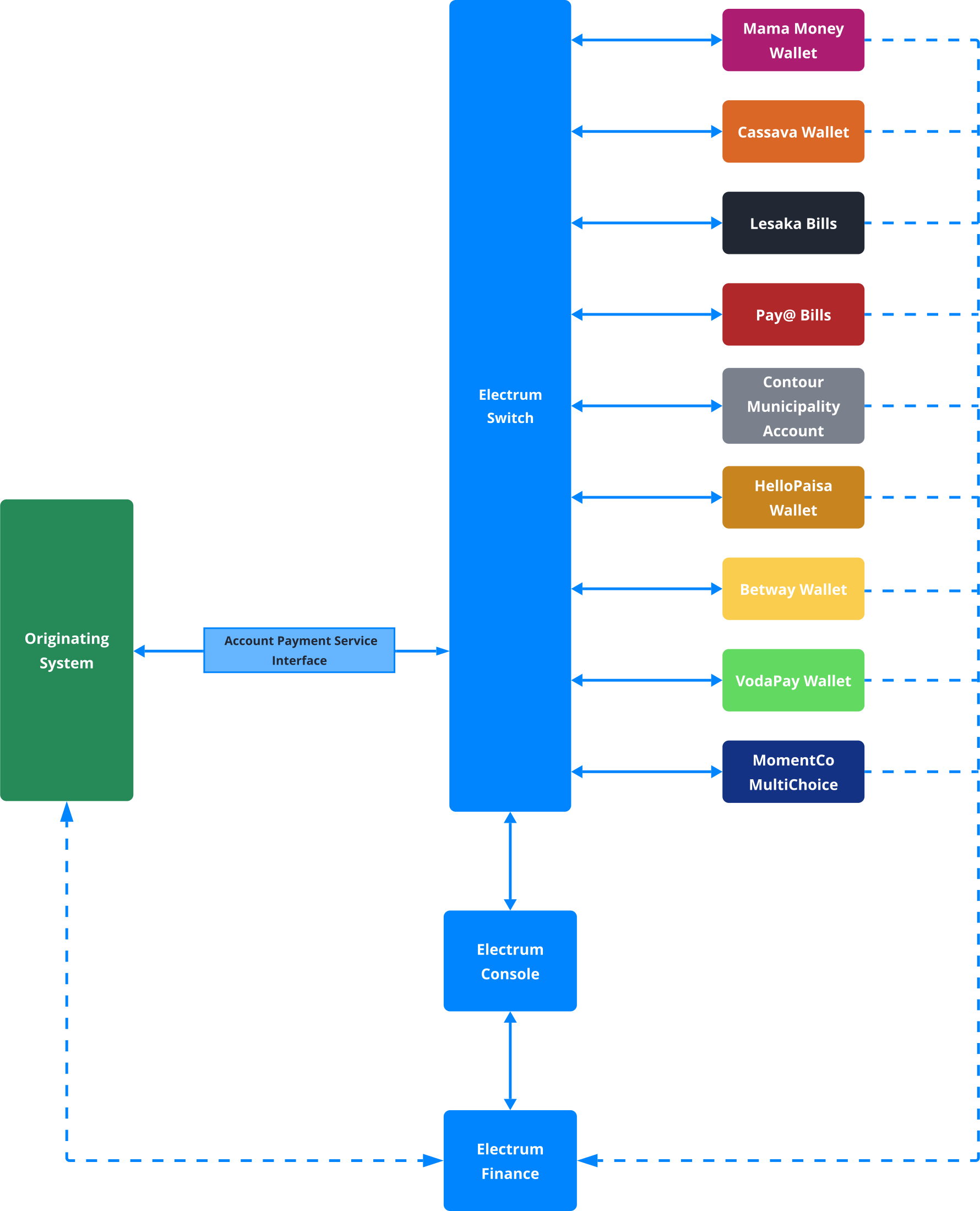
The figure below depicts the high-level architecture of the Account Payment Service Interface. The originating system – which could be a digital channel, or an in-store point of sale – communicates with the Electrum Switch via the Account Payments Service Interface. The Electrum Switch in turn connects to multiple service providers. Electrum Finance supports transaction matching, reconciliation, and financial reporting, while the Electrum Console is the system's user interface which provides tools for transaction lookup, configuration, reporting, and back-office functions.
Service Providers
The table below shows the service providers currently supported by the Account Payment Service Interface and the supported bill types.
HelloPaisa and Betway are not considered to be typical bill payment service providers. However, the transactions involved in the payment or transfer of money under these providers are similar to those of a typical Billpay Service process and comprise identical message flows. Additionally, some bill payments are not considered as a standard billpay type. For example, payments related to digital wallets, such as wallet top-ups, are considered non-standard due to their unique processing rules.
| Service Provider | Bill Types | Routing Types |
|---|---|---|
| Lesaka Bills |
| Prefix Routing - Standard routing type. (Biller routing can be used for specific instances). |
| Pay@ Bills |
| Prefix Routing - Standard routing type. (Biller routing can be used for specific instances). |
| Contour Municipality Account | Standard Contour bills | Biller Routing |
| HelloPaisa Wallet | Cross-border money transfers | Biller Routing |
| Mama Money Wallet | Cross-border money transfers | Biller Routing |
| Cassava Wallet | Cross-border money transfers | Biller Routing |
| Betway Wallet | Depositing of money into a consumer's Betway account | Biller Routing |
| VodaPay Wallet | Depositing of money into Vodacom wallet | Biller Routing |
| MomentCo MultiChoice | Multichoice bills | Biller Routing or Prefix Routing |
A standard bill is any bill where the account to be settled is identified by an account reference number. This reference includes a prefix that identifies the specific service provider or bill issuer where the account is held. Standard bills include those for municipal rates and electricity, as well as multiple independent issuers.
Routing
Some of the common routing methods are described below.
Prefix Routing
Most standard bills are routed via the prefix of the account reference number encapsulated in the accountRef field of the request message. You can read more about bill payment reference numbers here.
Traffic Fine Routing
Each customer has a priority list of service providers for traffic fine payments. The first provider on the list is the preferred provider and the rest are listed in order of decreasing priority. Traffic fine payments are routed via broadcasting coupled with priority listing as follows.
The referenceNumber of the bill lookup request is populated with either a traffic fine notice number or a consumer's national ID number. The request is broadcast to all service providers who support traffic fine payments. If more than one provider returns a success response, the preferred provider will be chosen for the payment transaction. If the preferred provider does not return a response, or returns an error, then the provider with next highest priority will be chosen.
Pay@ is the only service provider that currently supports the use of national IDs as reference numbers. Pay@ also supports the return of multiple traffic fines under an ID number reference.
Biller Routing
Certain bills can be routed to a preferred service provider chosen by the originating system. In this case the receiver.id field must be populated with the appropriate institution identifier to indicate the preferred provider. The values to be populated will be provided by Electrum. An example of this is Multichoice bills which could be routed to either Box Office or DSTV. In these scenarios, the service provider functions as both the provider and the biller. Electrum now also supports MomentCo Multichoice bills.
The service provider may act as an aggregator or operate directly as the biller.
Electrum Finance
Electrum Finance is a collection of tools to facilitate the reconciliation of transaction records between multiple parties, calculation of principal settlement amounts and fees, and generation of reports required for finance processes.
For more details of the processes and available features, see our Electrum Finance pages as well as this section of the Electrum Console help guide.
Support and Monitoring
The Transactions screen of the Electrum Console provides a detailed view of each transaction processed by the Electrum Switch. Here you can perform the following to help troubleshoot potential issues:
- Filter transactions based on various parameters
- Search for a specific transaction by its unique reference
- View a summary of pertinent data for individual transactions
- View the full request and response message traces between the originating system and the Electrum Switch
- View the full request and response message traces between the Electrum Switch and the service provider
For more details on how to utilise these features, see the Transactions page of the Electrum Console help guide.
Kibana Dashboards
Electrum uses the Elasticsearch, Logstash, Kibana (ELK) stack for low-level application monitoring. To assist you with supporting your services, we provide you with access to preconfigured Kibana dashboards to visualise traffic being processed by the Electrum Switch. The following dashboards are available:
- Message overview
- Message cog detail
- Health check
- Store-and-forward (SAF) queue
Alerts are also configured to send email notifications when the system health changes.
For more details on each dashboard type and its use, see the Monitoring and Alerts page.
Connectivity and Security
The standard connectivity and security between the originating system and the Electrum Switch is via HTTPS using basic authentication and server-side SSL. This requires that endpoints are allowlisted. The following additional security options are also available if required:
- HTTPS using basic authentication or OAuth2
- HTTPS using basic authentication or OAuth2 in conjunction with mTLS1.2+
- Connection via VPN
See here for more information about authentication options.
The requirements for connectivity and security must be discussed with Electrum prior to implementation.