Health API
As part of Electrum's ongoing efforts to improve operational observability, Electrum has introduced the Health API that allows you to query the health of entities. You can now integrate Electrum’s Health API with your own monitoring systems and dashboards. This will allow you to actively monitor, in real time, the broader health of your Electrum VAS services using any of your existing monitoring infrastructure.
Health is a measure showing whether the system is functioning optimally or not and whether transactions are proceeding as expected.
Electrum already performs service provider health checks through the Electrum Console Load Balancer feature. The Health API allows you to initiate these checks yourself and using your own systems.
You can send requests to the Health API at any time to retrieve information about aspects such as overall service health status, message success rate, and service provider availability.
Services: Core VAS product offerings offered (e.g., Airtime or PPU). Providers: Third-party institutions or vendors that facilitate services.
You can monitor these for services facilitated via both point-of-sale (POS) and digital channels (e.g., banking apps).
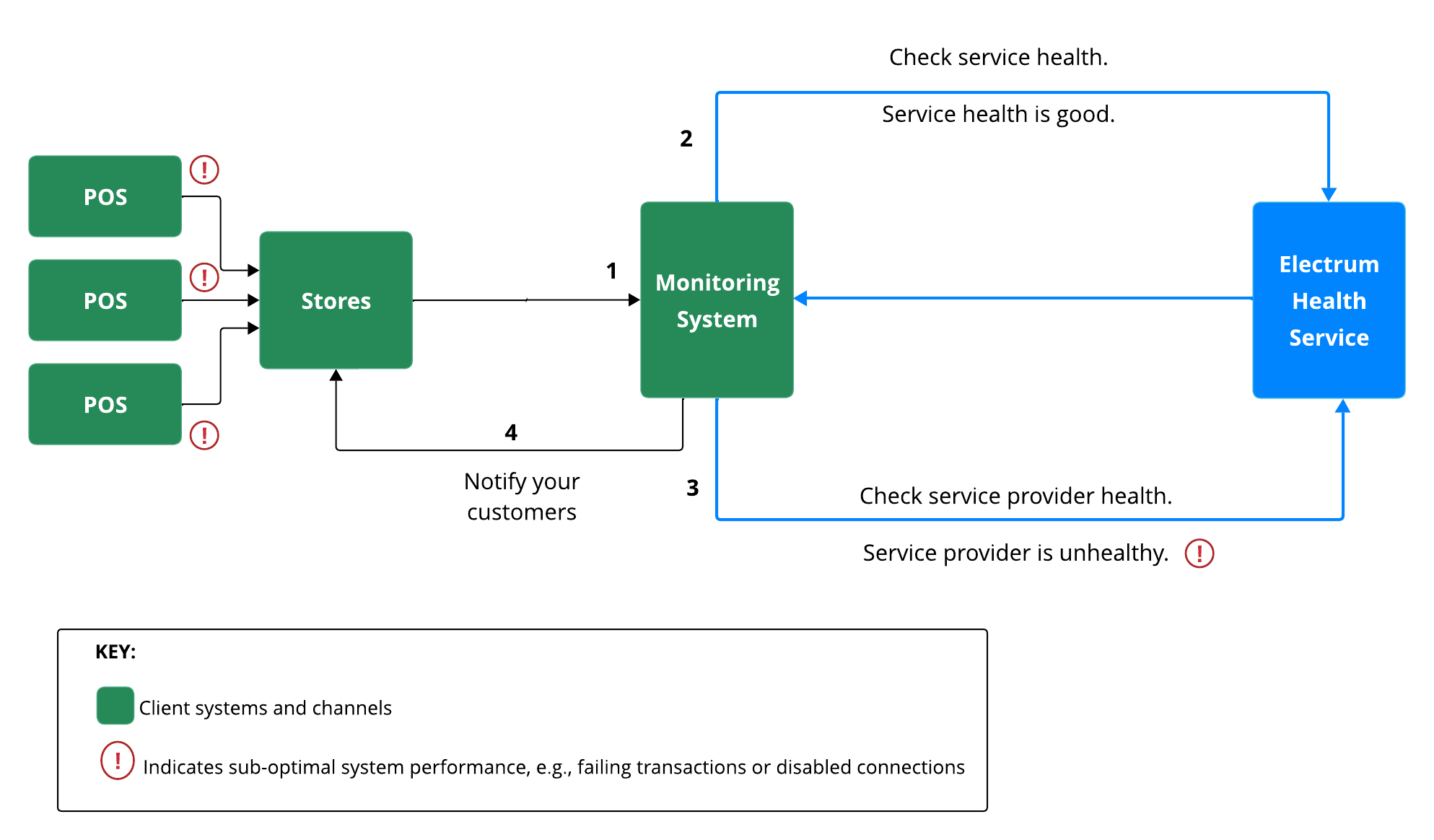
Access to this information will help you manage your service day-to-day and provide a better service to your customers. Consider the hypothetical example below, in which a retailer sells pre-paid electricity at their various stores.
Your monitoring system picks up that there are multiple failing pre-paid electricity transactions across multiple stores.
You request a health status check of Electrum’s PPU service.
If the response shows that PPU itself is operating normally (HEALTHY status) then you request a health check of all PPU service providers. The response shows that one of the service providers has an UNHEALTHY status, e.g., the connection to that provider is down and transactions can’t be processed.
Use this information to improve your customer experience. For example, cashiers at the stores can then inform customers that the provider is unavailable, before the customers attempt a failed electricity purchase. You can also inform operational teams to make decisions about where traffic should be routed using Electrum's load balancing capabilities.
Access the Health API
This API uses OAuth2.0 with the Client Credentials flow for authentication.
To make any request, you must first obtain an access token from the token endpoint:
https://auth.electrum.dev/auth/realms
You will need to exchange your client ID and client secret for a Bearer token. Include this token in the Authorization header of all subsequent API requests.
Example Request Header:
Authorization: Bearer [YOUR_ACCESS_TOKEN]
If you send a request without a valid token (or with insufficient permissions) then you will receive a 401 Unauthorized error.
Send a Request
To get access to the Health API, speak to your account executive or client service manager.
Monitor Service Health
Send a
GETcall to the/servicesendpoint. Populate the following optional query parameters if you wish to filter the results using various criteria:serviceType(string): Filter results by a specific service (e.g., "Airtime").status(string): Filter results by a specific health state (e.g., "UNHEALTHY").
Receive a response containing the current health status of all monitored services. The response message (see below) contains a
ServiceHealthResponseentity containing a list ofServiceHealthchecks.
Monitor Provider Health
Send a
GETcall to the/servicesendpoint. Populate the following optional query parameters if you wish to filter the results using various criteria:serviceType(string): Filter results by a specific service (e.g., "Airtime").providerId(string): Filter by a specific provider ID.
Receive a response containing the current health status of all monitored service providers. The response message contains a
ProviderHealthResponseentity containing a list ofProviderHealthchecks.
Response Objects
The ServiceHealth and ProviderHealth objects contain the following common fields:
state(string): The health state (see table below)throughput: The number of requests per secondsuccessRate: The percentage of requests that are successful (i.e., the customer received the product they were trying to buy).threshold: The configured performance threshold (e.g., minimum success rate) used to determine the health state.
Possible Health States
| Health State | Description |
|---|---|
HEALTHY | The component is operating normally. |
DEGRADED | The component is operational, but performance (e.g., success rate, throughput) is below normal threshold. |
UNHEALTHY | The component is failing to process requests and is considered offline or non-operational. |
DISABLED | Monitoring for this component has been intentionally disabled. |
PENDING | The system is busy calculating health status. |
UNKNOWN | The system cannot determine the health status. |