RTC Outbound Success
This section describes the expected message flow and Electrum Console view for an outbound RTC transaction.
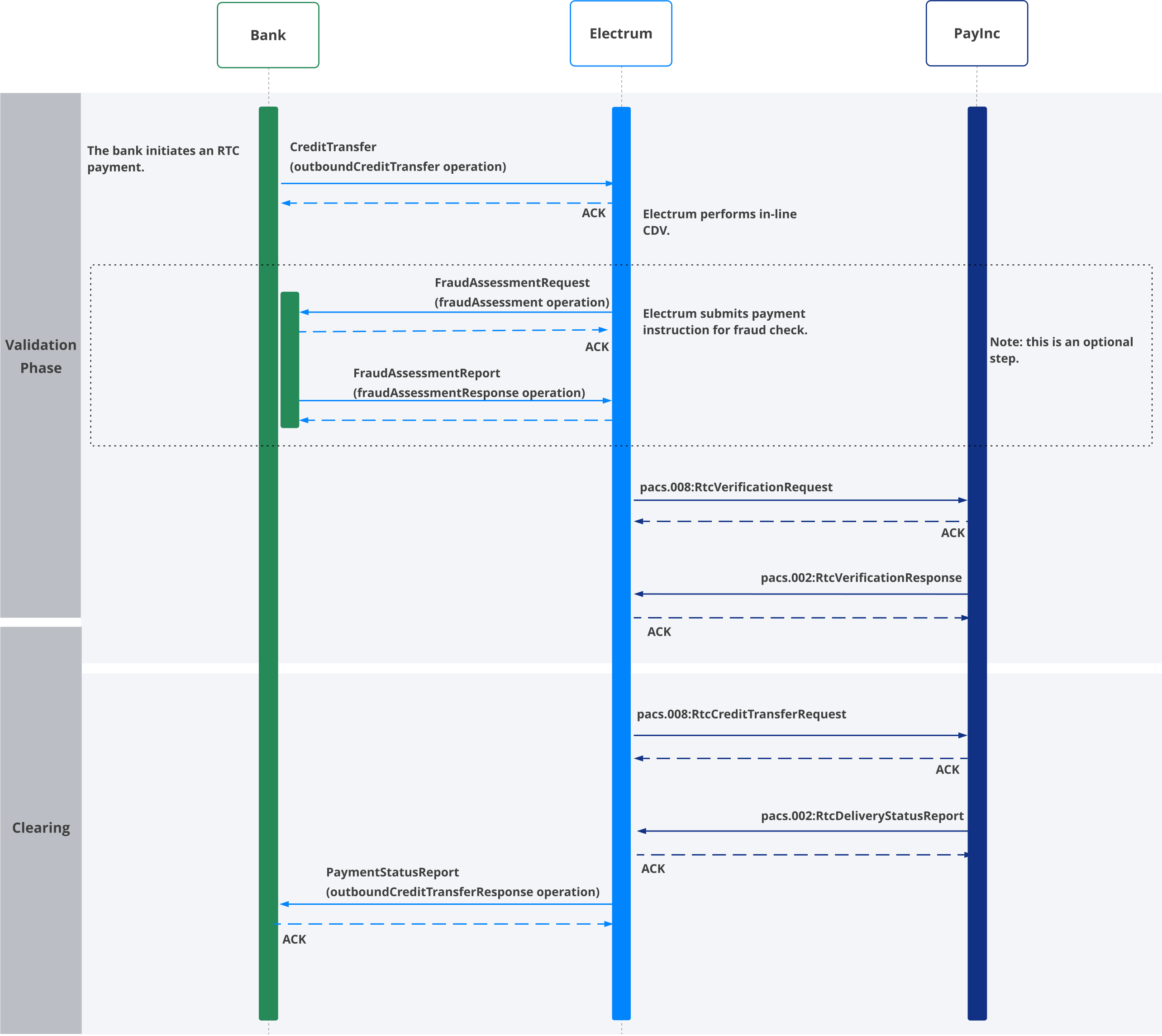
You initiate an RTC transaction by sending an
outboundCreditTransfermessage (CreditTransferschema), including the payee account number, to Electrum. Electrum returns an acknowledgement (ACK, HTTP200) to you.Electrum performs in-line CDV to confirm that the creditor account number included in the RTC request is valid.
Optional step: After successful CDV, Electrum sends an asynchronous
fraudAssessmentmessage (FraudAssessmentRequestschema) to the part of your system that deals with checks for fraudulent activity. You return an acknowledgement (ACK, HTTP200) to Electrum. You respond to Electrum using thefraudAssessmentResponseoperation (FraudAssessmentReportschema) once the transaction has been successfully checked for fraud. Electrum returns an acknowledgement (ACK, HTTP200) to you.Electrum sends a
pacs.008:RtcVerificationRequestmessage to PayInc and PayInc acknowledges the message.Electrum receives a
pacs.002:RtcVerificationResponsefrom PayInc confirming the RTC transaction can be sent to the receiving bank. Electrum returns an acknowledgement to PayInc.Electrum then initiates the clearing phase by sending a
pacs.008:RtcCreditTransferRequestmessage to PayInc. PayInc returns an acknowledgement.Electrum receives a
pacs.002:RtcDeliveryStatusReportfrom PayInc and acknowledges the message.Electrum informs you that the credit transfer was successful by sending an
outboundCreditTransferResponsemessage (paymentStatusReportschema) with statusAPPROVED, via SAF queue.
What You Should See in the Electrum Console
The Electrum Console view of the transaction should follow the pattern of the message flow. See the diagram below (in this case the optional fraud assessment step is included). Note that the messages have been labelled 1-16 for clarity here - you will not see this labelling in the Console. The messages involved are listed below the diagram.
To see the trace of any message, click on the Bank/BankservAfrica box or the associated arrow. The trace will appear below the Console diagram. You can view the message or save the message for troubleshooting purposes.
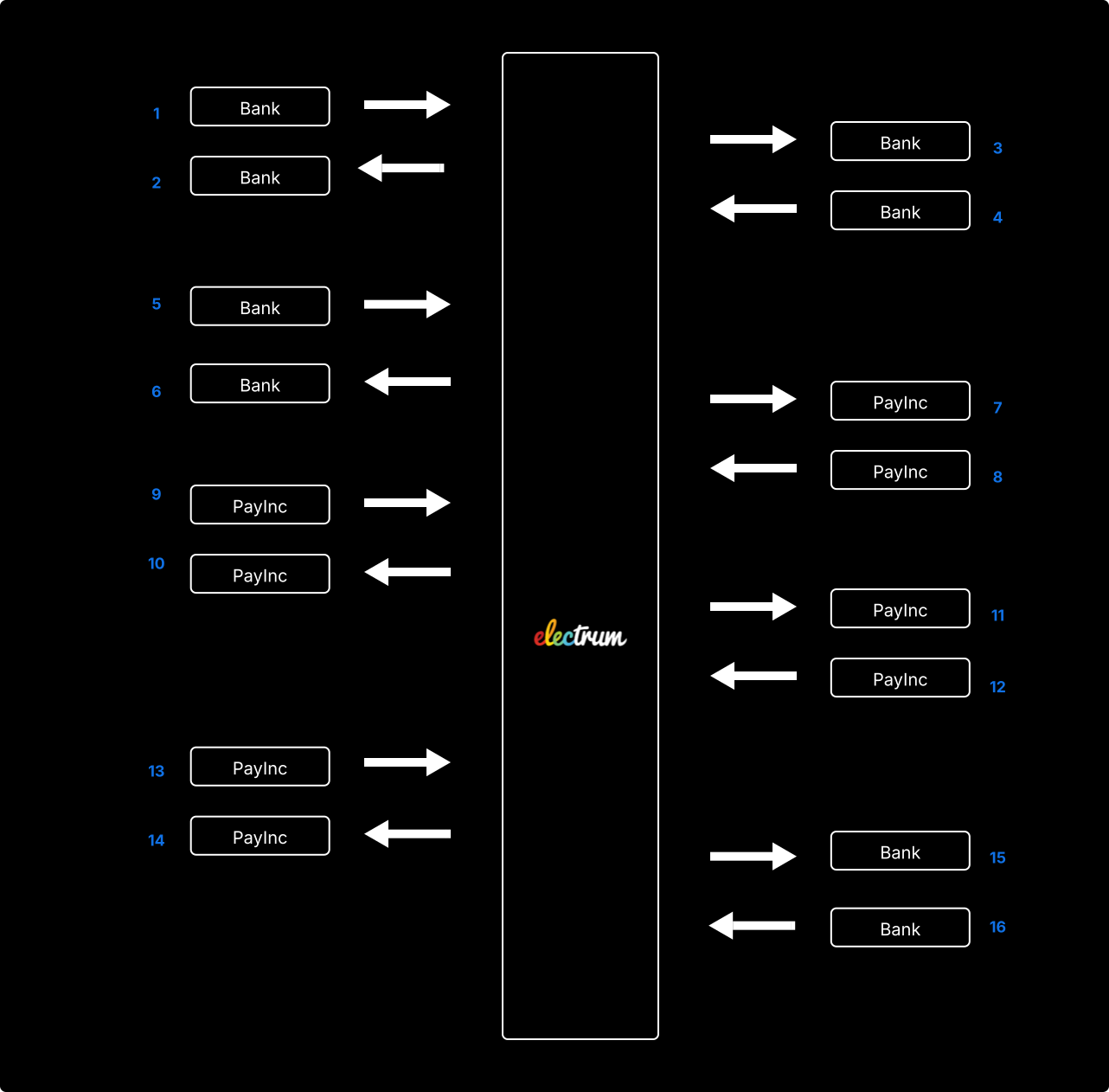
Message 1: CreditTransfer (outboundCreditTransfer operation)
Message 2: Acknowledgement of CreditTransfer
Message 3: FraudAssessmentRequest (fraudAssessment operation)
Message 4: Acknowledgement of FraudAssessmentRequest
Message 5: FraudAssessmentReport (fraudAssessmentResponse operation)
Message 6: Acknowledgement of FraudAssessmentReport
Message 7: pacs.008:RtcVerificationRequest
Message 8: Acknowledgement of pacs.008:RtcVerificationRequest
Message 9: pacs.002:RtcVerificationResponse
Message 10: Acknowledgement of pacs.002:RtcVerificationResponse
Message 11: pacs.008:RtcCreditTransferRequest
Message 12: Acknowledgement of pacs.008:RtcCreditTransferRequest
Message 13: pacs.002:RtcDeliveryStatusReport
Message 14: Acknowledgement of pacs.002:RtcDeliveryStatusReport
Message 15: PaymentStatusReport (outboundCreditTransferResponse operation)
Message 16: Acknowledgement of PaymentStatusReport